
Work orders
Work order management software for maintenance teams
Snippath turns every maintenance request into a trackable work order. Log an issue, set its priority, assign a technician, and watch it move from open to done — on web or mobile. It's a flat-rate work order system: one price per workspace, unlimited work orders on any paid plan, no per-user fees.
Three ways a work order gets created
Signed-in staff file an issue from the sidebar with a title, description, priority, photos, and an optional linked asset and location. Anyone else — a tenant, a gym member, a line cook — can use the public report form at your workspace's /report URL, no login and no app install. And every piece of equipment can carry a printed QR sticker: scanning it opens that same public form with the asset already selected, so the report arrives pre-linked to the right machine. All three paths land in the same queue as ordinary work orders.
Triage on a kanban board
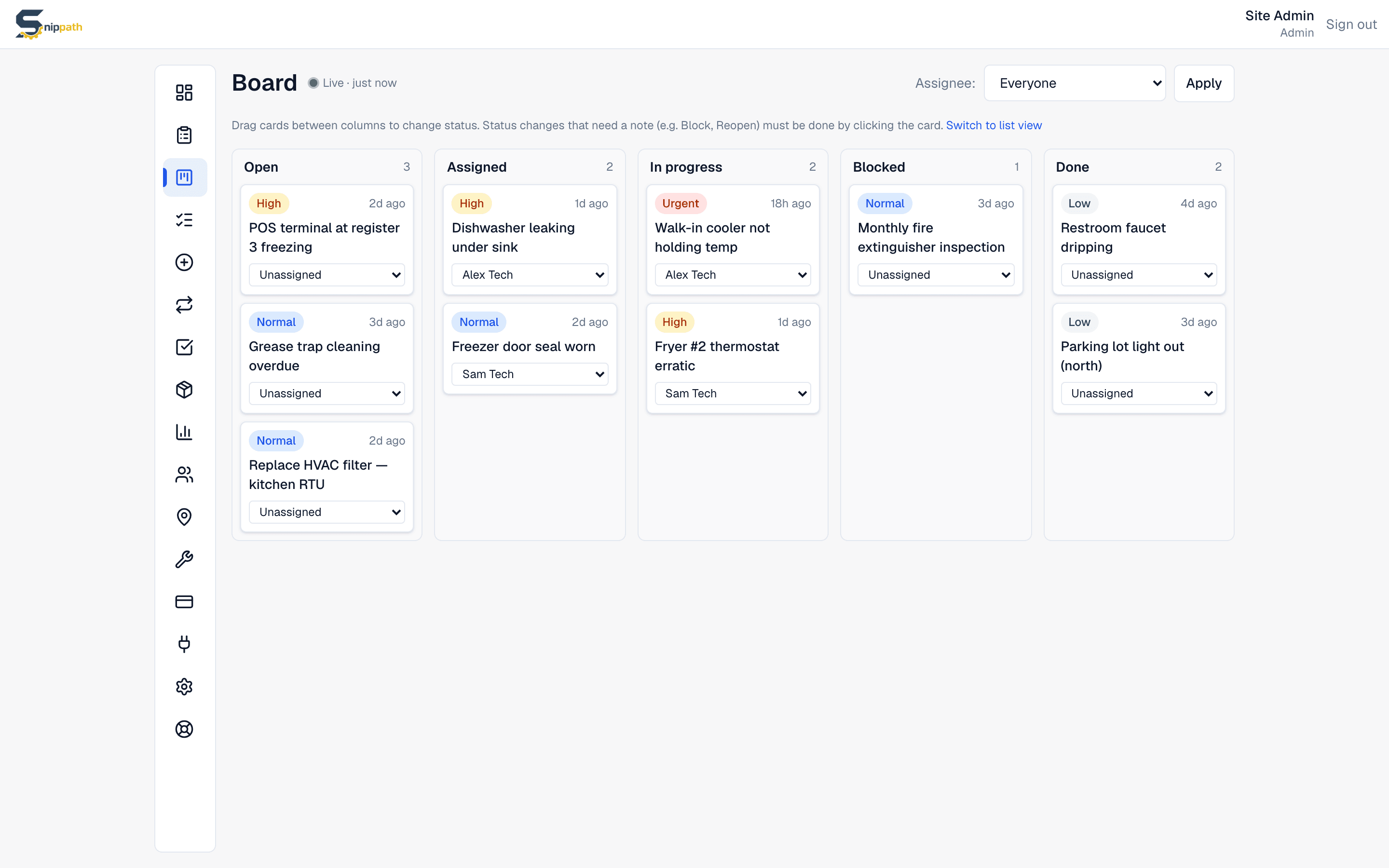
Managers work from a drag-and-drop board with Open, Assigned, In progress, Blocked, and Done columns. Unassigned reports pile up on the left; dragging a card onto a technician assigns it and fires a push notification to their phone. Priority runs from low to urgent, and an urgent report immediately pushes to every manager in the workspace. Moving a card to Blocked requires a short note explaining what's in the way — a part on order, a vendor, an approval — so stuck work is visible instead of quietly rotting.
Techs see their work, not everyone's
Snippath has three roles. Techs get a My assignments page with just their own tickets — they update status, comment, attach photos, log parts and minutes, and check off checklist items, but they can't see or reassign other people's work. Managers see everything: the board, assignment, equipment, schedules, and reports. Admins add user management and billing on top. The point is that a technician opens the app and sees exactly what they owe, nothing else.
The whole story stays on the ticket
Every status change, comment, and photo is recorded on the work order. Technicians log the minutes they spent in the work log and the parts they used, which decrements inventory and rolls the cost into the ticket and its linked asset. If a checklist is attached, the completed checklist is saved with the ticket too. Months later you can open any closed work order and reconstruct what happened, who did it, what it cost, and how long it took.
A realistic Tuesday
8:05 am, a cook scans the QR sticker on the walk-in freezer and types "not holding temp" with a photo. The report appears in the manager's Open column; she drags it onto Marco at high priority. Marco's phone buzzes, he opens the ticket, taps Start work, swaps the door gasket, logs one gasket from parts and 45 minutes of labor, adds a closing comment, and marks it Done. The whole loop — report, triage, fix, record — happened without a phone call or a whiteboard.
What Snippath doesn't do yet
Honest gaps: a work order has exactly one assignee, so co-working a job means coordinating in comments. There's no offline mode — techs in a dead-signal basement need to reconnect before updates sync. And there's no full-text search across comments yet. These are all on the public roadmap, but if any of them is a hard requirement today, a bigger CMMS like UpKeep or MaintainX may fit better — our comparison pages say so directly.
Flat-rate pricing, not per-seat
Most work order software charges $10–45 per user per month, which quietly punishes you for adding technicians. Snippath charges per workspace: free for 2 users and 25 active work orders, then $19, $49, or $99 a month flat, with unlimited work orders on every paid plan. A 15-person team pays the same $49 as a 5-person team. You can add the whole crew, and the part-timers, without re-doing the budget.
Frequently asked questions
- What is work order management software?
- It's software that captures maintenance requests as trackable work orders, then routes them through assignment, prioritization, and completion. Snippath does this with a drag-and-drop kanban board for managers, a My assignments view for technicians, and a full activity history — comments, photos, parts, and time logged — on every order.
- Does Snippath charge per user for work orders?
- No. Snippath is flat-rate — one price per workspace: free for 2 users, then $19, $49, or $99 per month with no per-user fees. Paid plans include unlimited work orders. Competitors like UpKeep and Limble typically charge $20–45 per user per month, so a 15-person team can pay thousands more per year for the same core workflow.
- Can technicians manage work orders on their phone?
- Yes. Snippath has a native iOS app on the App Store, and on Android it installs to the home screen as a web app — both with push notifications for assignments and comments. Techs view, update, comment on, photograph, and close work orders from the field. One honest caveat: there's no offline mode yet, so a live connection is required to sync updates.
- How do people submit work orders?
- Three ways: staff file issues inside the app; anyone can use the public report form at your workspace's /report link with no login; or they scan a QR code stuck on the equipment, which opens that form with the asset pre-selected. Public reports land unassigned at medium priority for a manager to triage.
- Can every technician see every work order?
- No, and that's deliberate. Techs see only the tickets assigned to them (plus any they choose to watch), which keeps their queue focused. Managers see all work orders on the board and handle assignment and reassignment. Admins add user management and billing. Roles are per-user and can be changed at any time.
- Is there a limit on how many work orders I can create?
- The free plan allows 25 active work orders at a time — closed ones don't count, so small teams can run on it indefinitely. Every paid plan ($19, $49, or $99 per month flat) removes the cap entirely: unlimited work orders, unlimited photos, full history.
Related
More features
See it for your industry
Snippath is a flat-rate CMMS — work orders, preventive maintenance, parts, and QR-code reporting, one fee per workspace. Free for 2 users.